


Getting spam or unwanted emails on your AOL inbox making frustrate you and unable to access your important documents and emails so this guide is a well-suited platform to fix out your this troubles here you can learn how to block emails on aol.
Spam messages are a constant threat to people’s privacy. They can also be used for email spoofing, where the attacker sends malicious emails to the receiver or phishing scams. However, the mail services filter most of these emails, but the user must also take precautions from their side.
Block Unwanted Spam emails in AOL Website Using Spam Mail Filters


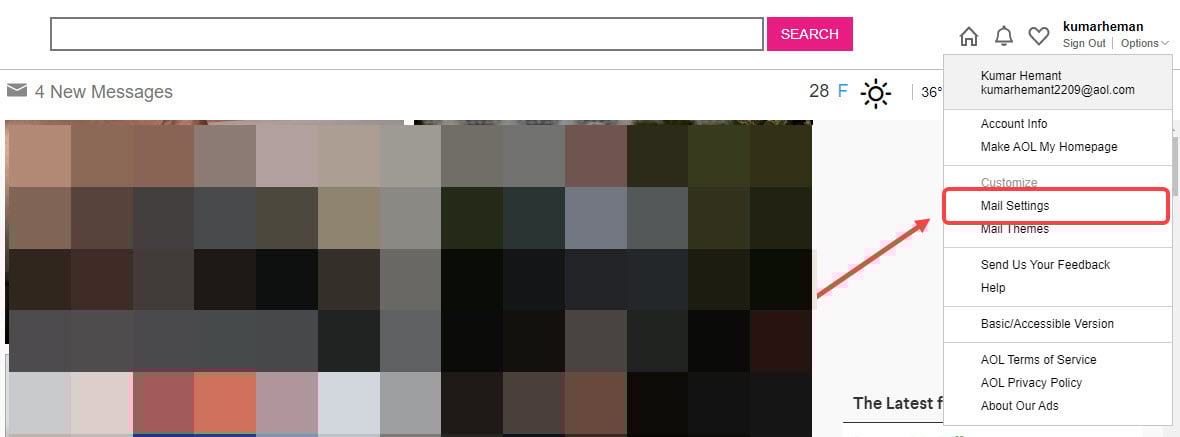

Step 1: Click on the mail icon at the top right or click on the Mail option on the left sidebar. Step 2: Now, click on Options at the top right, below your account name.Step 3: From the drop-down menu, select the Mail Settings option.Step 4: After that, select the Spam Settings from the left sidebar. Here, enter the address of the sender that you want to block and then click on the Plus button to add the address to the block list. When you are done, click on Save Settings. Now, you can relax, as all the messages from the sender will go to your Spam box. For more security, Go to General tab on the left sidebar and then click to turn on the following options:
- Hide images in the mail from unknown senders.
- Disable links in mail from unknown senders.


If you want to send a particular email to the spam box, tick mark on the box at the left side of the email and then click on the Mark as Spam option at the top (refer the screenshot below). If, on the other hand, you want to unmark the email as spam, go to the Spam folder form the left sidebar, tickmark the email and then click on the Not spam option which looks like the OK button. Currently, you cannot block the emails from the AOL app for Android and iOS
Next Heading is about What will you do when someone Forgot their AOL Email Password
Getting Stuck at the time of AOL email access or sign in might that forgot aol password problems or password may be lost so you need to reset your aol password so for that follow these 6 steps as mention below here:
- All right! So the first thing you got to do here is visit the official AOL page and fill the username or Email ID.
- You will now be prompted to the Next tab. Just click on it.
- Now it’s time to enter the username. After which you are required to click on the forgot password option.
- Complete the identification process carefully to get your AOL.
- For securing your AOL account change the password by entering the last password remembered and form a new password by using characters, numbers, and alphabets. You got to be really smart here because your password should be easy enough to stay in your mind forever and hard enough to be guessed by others.
- Enter the new password twice for confirmation. And that is it.
